Share Counter
Count together,
in real time
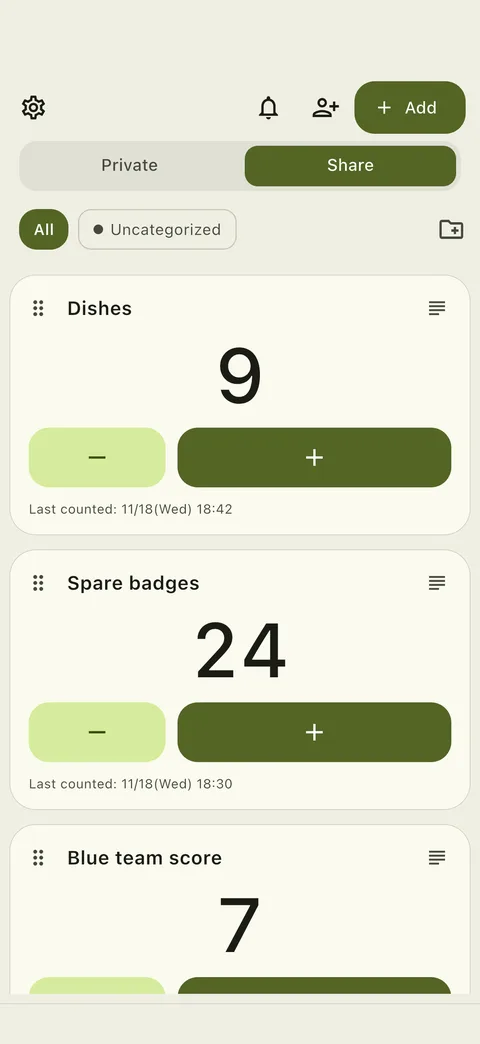
Chores, supplies, scores. Share Counter is a free app that lets you share one counter and count together. When anyone taps, the number updates on everyone’s screen in real time.


Tap “+” on Aki’s or Yu’s screen.
The other screen updates instantly.
- +18 → 9 Aki
- +17 → 8 Yu
- +16 → 7 Aki
One counter,
on everyone’s phone.
When someone counts, the number changes on every member’s screen right away.
Everyone always sees the same number
Tap +1 and it shows up on everyone else’s screen instantly. Groups can mix iPhone and Android.
Sharing is free, too
Creating, joining, and inviting to a group costs nothing.
Invite with a link or QR code
Send an invite link through any messaging app, or let them scan a QR code. Invites stay valid for 7 days.
See who counted and when
The activity history shows who counted and when, so missed or double counts are easy to spot.
Notifications, goals, and auto-reset
Get notified when a member counts or when you reach a goal. You can also reset automatically every day or week.
No account needed
No sign-in. Just install the app and start counting.
Organize with folders
Keep things tidy with folders, even as your counters grow.
English and Japanese
The app follows your device language and shows English or Japanese.
Get started in 3 steps
Create a counter
Just name what you want to count.
Send an invite
Share an invite link, or have them scan a QR code on the spot.
Count together
The number stays in sync on everyone’s screen in real time.
Made for counting together
From sharing chores at home to counting event attendance and taking inventory — anywhere several people count the same thing.
Track chores and baby care as a family
Log dishes, trash runs, feedings, and diaper changes with your partner or family — and see who did what.
Count event or store visitors with a team
Even with several entrances, everyone counts on the same counter, so you always know the total headcount.
Split up stock counts during inventory
Divide the work, and every count still adds up on one counter.
Keep score for teams, sports, and games
Everyone on the team can see the score or practice count on their own phone.
A simple counter just for you
No need to share — use it as your own tally counter.
Goals and auto-reset
Get notified when you hit a goal, and reset daily or weekly to track habits.
Share Counter at a glance
Share Counter is a free app that lets multiple people share the same counter and count together in real time. It runs on iPhone, iPad, and Android, and is built and run by an independent developer.
- Price
- Free (with ads), including sharing
- Devices
- iPhone and iPad (iOS / iPadOS 15+), Android (7.0+)
- Account
- Not required
- Invites
- Invite link / QR code (valid for 7 days)
- Sharing
- Works between iPhone and Android
- Key features
- Real-time sharing, activity history, notifications, goals, auto-reset
- Languages
- English, Japanese
- Developer
- Ryota Nakamura (independent)
Can family and friends share the same counter and count together?
Yes. Each member counts on the same counter from their own phone. When anyone counts, the number updates on everyone’s screen in real time.
Can iPhone and Android users share a counter?
Yes. A group can mix iPhone, iPad, and Android devices and still share the same counter.
Is it free?
Yes, Share Counter is free to use. The app shows ads.
Does sharing cost anything?
No. Creating, joining, and inviting to a group are all free.
Do I need an account or to sign in?
No. Just install the app and start using it.
Can I use it to count event attendance or headcount?
Yes. Even with several entrances or staff members, if everyone counts on the same counter, the total appears on everyone’s screen right away.
How do I invite family or friends?
Send an invite link from the app, or have them scan a QR code. Invites are valid for 7 days after they’re created.
Can I see who counted?
Yes. Each counter’s activity history shows who counted and when, and you can get notified when a member counts.
How do I leave a group?
Delete your shared data in the app’s settings to leave the group. To rejoin later, you’ll need a new invite.